

As an avid gamer and consumer of gaming content (YouTube playthroughs, reviews, events, etc.) I have experienced games in multiple formats with consoles such as the PS5, Xbox, and Switch. My main formats for gaming have been on TV’s (35in, 55in, and 65in) and handheld consoles (Nintendo Switch OLED, PlayStation Portal), with some experience on monitors (both gaming and non-gaming monitors). Then, I learned about a new format for gaming: Gaming Projectors. BenQ, a leader in gaming projector technology, has a strong selection of gaming projectors for all types of rooms/setups, and I have been lucky enough to experience gaming on the X3100i, their flagship console. Having played on it for a long time now, I’m going to provide an in-depth review of the gaming experience on the projector. This post is NOT sponsored by BenQ. Check out my setup here!
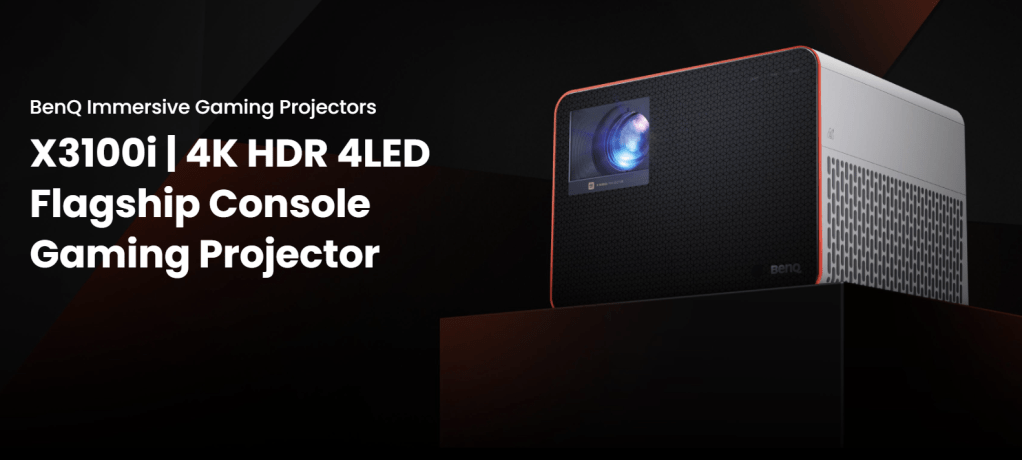
About the Projector
The X3100i is a 4K HDR 4LED high brightness console featuring BenQ CinematicColor and CinematicSound technology, both of which were designed to enhance the gaming experience. It covers 100% of the DCI-P3 color space and boasts 3300 ANSI lumen high brightness. It supports 40-60% vertical lens shift for ultimate installation or placement flexibility and has a throw ratio of 1.15-1.15 with 1.3x zoom to project a screen size of up to 200in. It offers various game modes, RPG Mode, SPG Mode, SPS Mode, and RCG Mode, with the lowest input lag at 4.16ms in 1080P@240Hz. It auto game detection to set to the right game mode so you can switch consoles and games with ease, and the FPS mode has the Crosshair feature to project a targeting reticle onto the screen. The projector has an MSRP of $2399 (BenQ estore offers free shipping & deals often) and they have some recommended products for it should you need a remote control replacement or a ceiling mount.
This may seem like a lot of information, but don’t worry, the projector is smart and does most of the work for you. The process of setting it up is fairly simple and doesn’t take more than a few minutes, if that. However, if you find yourself adjusting settings or looking to try out different game settings, BenQ offers a program called SettingXchange where you can share your settings for certain games or download presets from other gamers (it does require connection to your laptop and downloading the program).
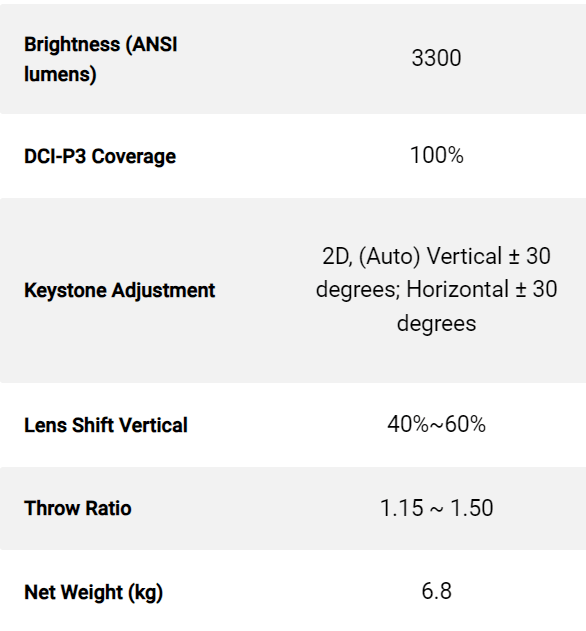
For a quick summary of information, check out this chart. If you’d like more information on the projector specs, you can check out the spec page here or look up some video reviews on YouTube. It should be noted that the projector is HEAVY and is not intended to be moved around a lot, so be sure to get it set up in one location and plan to keep it there!
The Gaming Experience
Before I share my gaming experience on the projector, keep a few things in mind. As of publication of this article I have: only experienced three gaming projectors (all from BenQ), only utilized RPG Mode, and only used a 75in screen (not a wall or larger screen). While I can speak confidently on my experience of it, be sure to do other research before making a decision on purchasing a gaming projector.
Now, the gaming experience. The projector’s intention is to create a cinematic and fully immersive experience for gamers, regardless of what you’re playing. Overall, they have achieved this experience for the games I have played, with strong brightness and vibrant colors. Being unfamiliar with gaming projectors, I took extra time to set up everything, adjust as needed, and test out a few games to see how the settings and visuals changed per game. The easiest console to use is a PS5, as the Switch requires far more adjustments due to its different formatting. Watching it shift between settings was fascinating and the clarity while playing these games was stunning. Even in a small space the projector does not feel overwhelming and creates the immersive experience every gamer is looking for. The brightness holds strong during the day, but at night with the lights off is when it looks the best, making the games come alive.

So far I have played an extensive list of games on it, experiencing the most colorful games to the darkest ones. The best looking games have a lot of blue and red tones, but I did struggle with the visuals for Alan Wake 2 because of how dark the game is. The best way to play on a gaming projector is in a darker room, so either at night or with lights out. There’s no glare, but the brightness of your space does affect how clearly you can see everything. For darker games, mainly horror, you really need to play in a fully dark room to be able to see everything, but the more colorful the game the better an experience you’ll have.

The projector also has TreVolo speakers that really enhance the experience, especially in smaller spaces. Of course, the location of the projector in your room and/or the inclusion of a surround sound system will impact this, but on its own, both behind and next to me, the sound quality is great. It sounds similar to watching a movie in the theater, with a deep bass and wide tonal range.
Other Options
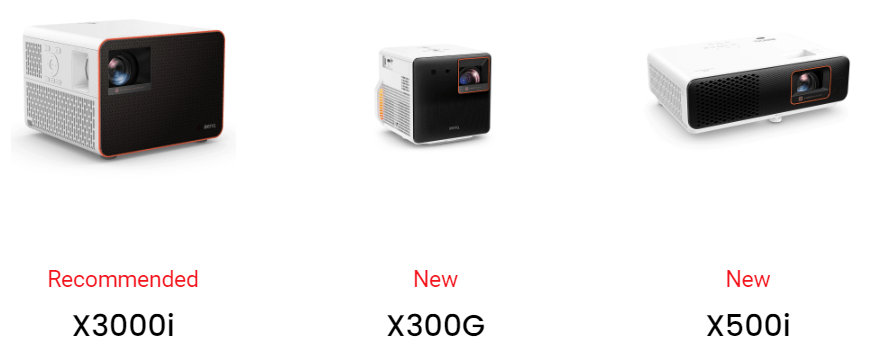
While the X3100i is hands down the best option for the ultimate gaming experience, you may want something within your budget or that’s more portable. BenQ offers a few other gaming projectors of similar quality for you to experience full immersion. You can check out the X3000i, the X300G, or the X500i to see which is a good fit for you. They do have some other options as well, but these are the only ones with features fully designed for enhancing the gaming experience.
Please note that the projector is on loan from the company, I did not purchase it, but when the time comes to return I will strongly consider purchasing one to continue gaming on it. If you decide to get a gaming projector, or already have one, please share your thoughts below and give a shout-out to BenQ on social with an image of your gaming setup!
Thanks for reading! If you liked this post and want to see more of what I’ve written, check out my full blog here or follow my social media for updates! Bluesky & Instagram & Pintrest




 Writing Until Ragnarok
Leave a reply to X300G BenQ Gaming Projector Review – Writing Until Ragnarok Cancel reply